
Which V-Fold Should You Use? Right-Angle, Acute and Obtuse Compared
Choose a symmetric V-fold for an upright or leaning pose. Compare three paper angles in 3D, check opening range and closed-page fit, and find matching A4 SVG patterns.
For your first symmetric V-fold, start with the right-angle pattern. If the subject should lean, compare acute and obtuse folds at the same mounting and orientation. If the direction works but the amount of lean does not, check the mounting angle. If the closed sheet sticks out, check position and size.
This guide helps you choose rather than repeating the full assembly lessons. It reuses three existing 3D experiments and links to their lessons and A4 SVG patterns. Keep the stated dimensions, mounting angles and page-opening angles fixed when making comparisons.
1. Choose by the result you want
Start with the pose you want when the book is open. The table below compares our symmetric examples at the same mounting angle C=D=130° and page opening θ=180°, with the whole mechanism facing the same way. It describes these examples, not every possible mounting arrangement.
| Your goal | Try first | Why, and what to check next |
|---|---|---|
| First build, or an upright centre crease | Right angle: A=B=90° | The centre crease is perpendicular to the flat base in this setup. Learn creases, tabs and a full opening cycle first. |
| A lean toward one end of the spine | Acute: A=B=60° | The crease leans relative to the right-angle example. Use the preview to check the direction against your composition. |
| A lean toward the opposite end without turning the mechanism | Obtuse: A=B=120° | This setup leans opposite to the 60° example. Check closed-page fit as well. |
| The direction is right, but you want a more upright pose | Adjust the mounting angle first | Compare C=130° and 150° on the same 60° or 120° sheet before recutting the wings. |
| It fits when open but sticks out when closed | Check position and size first | A different V-fold family does not automatically solve packing. Move the whole assembly inward and check again. |
For example, start a standing character with the right-angle sample and compare leaning versions only if the composition needs them. A pumpkin, animal or building is not inherently an acute or obtuse subject: the crease geometry, mounting and orientation determine its motion. Turning the whole mechanism also changes which way the lean appears in your scene.
2. Classify the paper angle, not the page opening
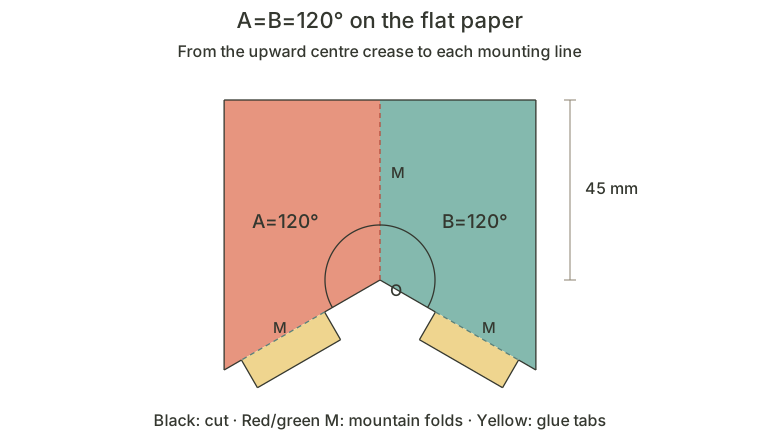
Unfold the mechanism sheet before classifying it. Measure A and B within the paper, from the upward centre crease at O to the extended mounting creases. In this symmetric series A=B and C=D. A sharp cut outline or a narrow-looking photograph does not identify an acute V-fold.
| Angle | Where to measure | What it means here |
|---|---|---|
| Paper angles A, B | On the unfolded mechanism, between centre and mounting creases | A=B<90° is acute; 90° is right; 90°<A=B<180° is obtuse. |
| Mounting angles C, D | On the base, from the downward spine ray at O to each mounting line | They specify how the sheet mounts to the base. Start at 130° and compare 150°. |
| Page opening θ | Between the two book pages | 0° is closed and 180° is flat open. This does not classify the paper angle. |
If you cannot yet identify these lines, use the labelled diagrams in the right-angle lesson. Keep the same reference rays when the mechanism changes shape or orientation.
3. Compare all three under the same conditions
This reuses the three-angle experiment from the obtuse lesson. It starts at A=B=120°. Select 90°, then 60°, then 120°, keeping θ at 180° and the camera still. All presets have C=D=130°, 45 mm centre creases and mounting edges, and the same O position. The wing outline changes with the paper angle.
Continue with the annotated diagrams below.
- At 90°, use the upright centre crease as your reference.
- At 60° and 120°, watch the centre crease lean toward opposite ends of the spine. Choose the direction your scene needs, rather than the name that sounds more advanced.
- Repeat at θ≈90°, then close to 0° and reopen. A useful pose must be checked through motion, not just at the fully open endpoint.
The descriptions above remain the comparison when 3D is unavailable; the static diagram labels the obtuse sheet used by the experiment. For an upright centre crease in this setup, choose 90°; for opposite lean directions at the same mounting and orientation, compare 60° with 120°. This does not promise that an arbitrary attached image will stand vertically or avoid other parts.
4. When the direction works, try the mounting angle
If the lean direction is right but the pose is too low, try a mounting change before choosing another family. Here A=B=120° stays fixed. Compare C=D=130° and 150° at θ=180°: the 150° preset has a more upright centre crease. The acute lesson shows the same comparison for its 60° sheet. These are specific presets, not a rule that every larger C always makes every V-fold more upright.
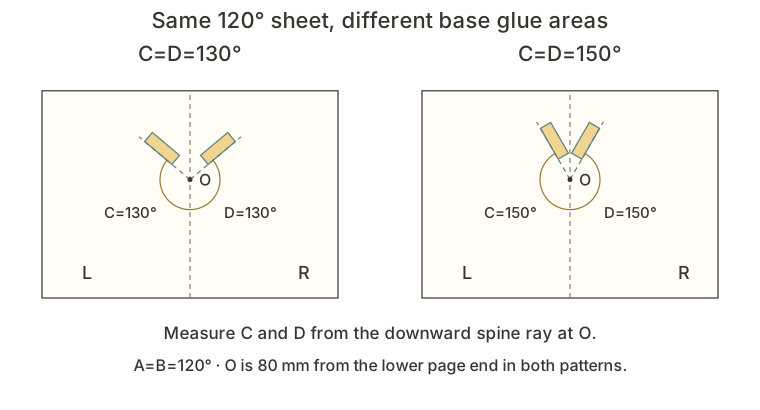
Continue with the annotated diagrams below.
Now select C=D=80° · limited. The angular solution stops at about 123.1°, so this is not a replacement for a card that must open flat to 180°. This counterexample also does not prove collision-free motion against the base. Choose the 130° practice pattern first; return to the detailed lessons before exploring other mounting ranges.
A fold that moves is not necessarily a fold that opens fully. If a paper sample resists, stop and check the creases and mounting. Bending the card by force is not a successful geometry check.
5. If it sticks out, check position and size
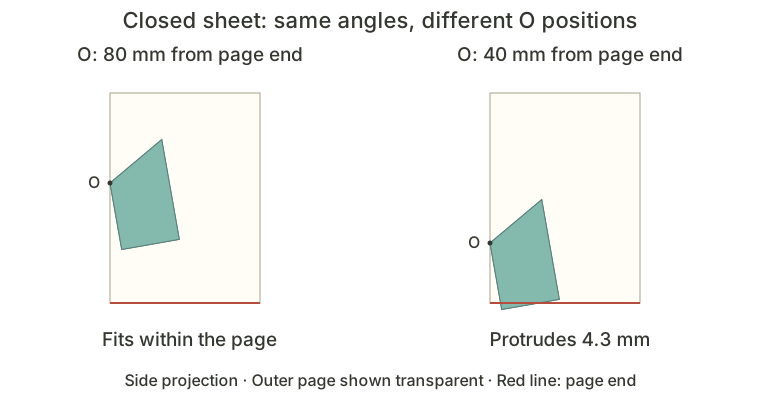
Closed-page fit is a separate decision. Keep A=B=120° and C=D=130°. Compare O at 80 mm and 40 mm from the lower page end, and close each preset fully. Both glue areas move together with O; the sheet and angles stay the same.
Continue with the annotated diagrams below.
The 40 mm preset fits between the page ends when fully open but protrudes by about 4.3 mm when closed in this ideal model. The first thing to try is moving the whole assembly inward. If space is still insufficient, reconsider size or composition, then repeat the opening check. Changing only one glue tab would no longer preserve the symmetric setup.
This indicator checks the two page ends only. Also inspect side edges, tabs, paper thickness and other parts. Packing is worth checking for all three families; it is not a flaw exclusive to obtuse folds.
6. Turn your choice into a repeatable practice
- Describe the intended open pose: upright, or leaning toward a chosen end of the spine. Note which way the whole mechanism faces.
- Start with A=90°, C=130°. If the scene needs a lean, compare A=60° and 120° without changing C or the camera.
- Once the direction works, compare mounting presets on the same sheet. Check the required opening range and avoid the limited counterexample for a flat-opening card.
- Close to 0°, check intermediate positions and reopen. Check packing separately, then add artwork and repeat with the final size and outline.
- Make a plain-paper sample before decorating. Record A, C, mounting position and sheet size so you can reproduce a useful result.
In FoldUStory, open the symmetric V-fold template, place it on a book page, then explore its angles. The workbench starts with triangular wings; these lessons use different practice outlines to explain the same angle relationships. Make a plain-paper sample and check the creases, glue areas and closed-page fit before adding artwork.
7. Get the matching pattern and continue
These existing lesson files are free A4 SVG downloads and do not require an account. Use each lesson's assembly instructions. The base sizes and print orientations differ, so use the 3D experiment above when you need a comparison with controlled dimensions.
| Sample | A4 SVG | Assembly guide |
|---|---|---|
| Right: A=90°, C=130° | Download SVG · Landscape | Read the lesson → |
| Acute: A=60°, C=130° | Download SVG · Landscape | Read the lesson → |
| Obtuse: A=120°, C=130° | Download SVG · Portrait | Read the lesson → |
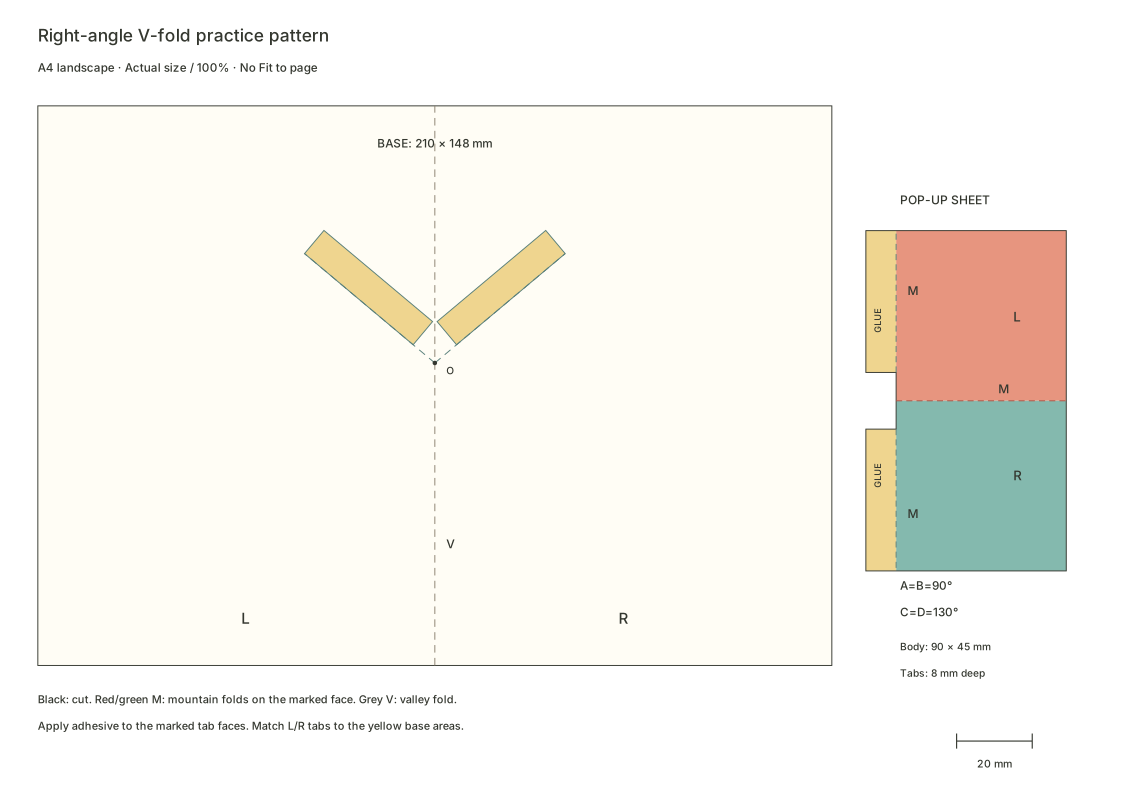
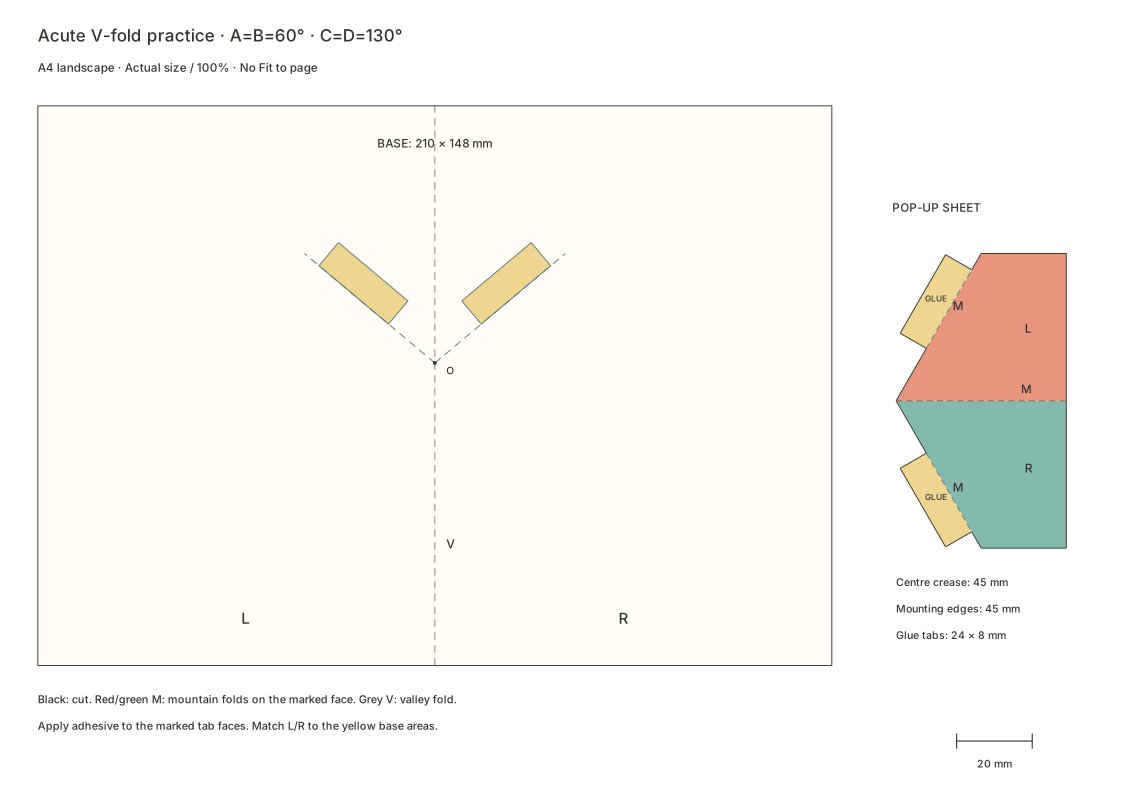
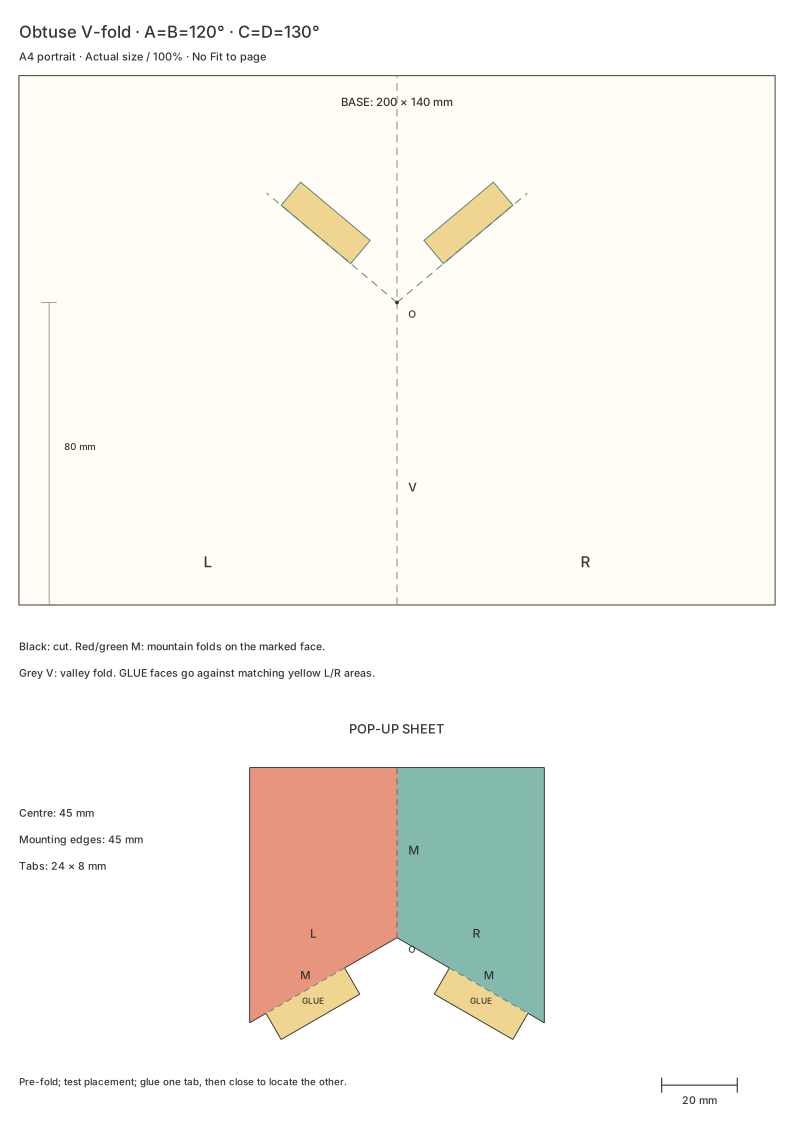
Print at 100% / actual size, disable Fit to page and measure the 20 mm calibration line before cutting. The 150° mounting alternatives remain in the acute and obtuse lessons. We do not provide the limited 80° or protruding 40 mm examples as build patterns.
Once you can explain your choice and close the sample cleanly, continue to the V-fold artwork and mounting lesson to apply a basic structure to artwork.
Questions you may have
What distinguishes right-angle, acute and obtuse V-folds?
They differ in the paper angle on the unfolded mechanism: 90° for right-angle, below 90° for acute and above 90° for obtuse. A symmetric model also has equal left and right paper angles and equal mounting angles. These names do not describe the page-opening position.
Is changing the V-fold type enough to make a character more upright?
Mounting angle, orientation and connections also matter. Hold page opening, viewpoint and dimensions fixed, change one parameter and then check closed-page fit. A trend between two presets does not establish a rule for every mounting branch.
Which V-fold should I build first?
Build the right-angle lesson's plain-paper sample first to identify the centre crease, mounting creases and tabs, then compare the acute and obtuse versions. Choose for the intended artwork direction, mounting space and closed-page fit.