
Obtuse V-Fold Tutorial: Mounting Angles and Closed-Page Fit
Three 3D comparisons and two patterns explain mounting range, lean and closed-page fit for a 120° sheet.
How to make and compare two obtuse V-fold samples
Use this lesson's SVG pattern with a 120° paper angle. Follow the route below and the detailed diagrams for fold directions, glue areas and dimensions. Prepare card, scissors, a ruler, a blunt scoring tool and suitable paper adhesive.
Download and check print scale
Download both the C=130° and C=150° SVGs. Print portrait on A4 at 100% or actual size, disable Fit to page and measure the 20 mm calibration line.
Score before cutting
Score the grey spine, red centre crease and green mounting creases. Cut the black outer outlines, keep both tabs and remove the gaps between them. Leave dashed fold lines intact.
Pre-fold from the marked face
Follow the pattern marks: mountain-fold the red and green creases and valley-fold the grey spine. Work the creases gently so the tabs fold behind the wings.
Test the placement without glue
Align the lower end of the centre crease to O and the tabs to the yellow L and R areas, GLUE faces toward the base. Close gently and check that creases move, tabs stay clear of the spine and the sheet fits inside.
Attach one tab, then locate the other
Glue one tab thinly onto its matching area. Glue the second, fold the mechanism into its pre-creased closed position and close the base to help locate it. Keep glue off moving creases and follow the adhesive's pressing and setting instructions.
Make the second sample and compare equal openings
Build the other mounting version with its own parts. After the bonds set as directed, compare both samples closed, at about 90° and fully open, then close again. If either resists, reopen and check mounting angles and page-edge fit separately.
The previous lessons introduced right-angle and acute V-folds. Now increase the paper angle to 120°, observe how the centre crease changes direction, and check something an open composition can hide: does the sheet still fit when the book closes?
Keep one simple mechanism. Three comparisons separate the effects of paper angle, mounting angle and position; two printable patterns bring the experiment onto paper.
1. Measure the obtuse angle on the unfolded sheet
If the creases and angle labels are unfamiliar, start with the right-angle lesson and acute lesson. We keep the same A, B, C, D and page opening θ throughout.
Unfold the sheet and label the lower end of the centre crease O. Extend both green mounting creases to O. Measure A and B from the upward centre crease to each mounting line within the paper. A symmetric obtuse V-fold has 90°<A=B<180°, with equal base mounting angles C=D. We use A=B=120°.
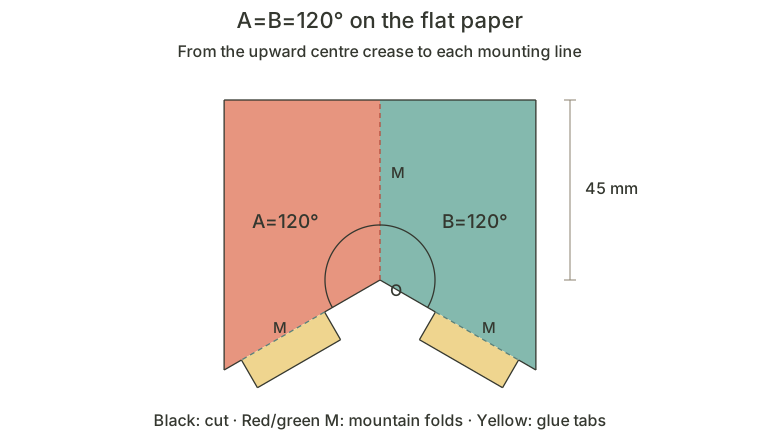
Compared with the 60° pattern, the mounting lines pass beyond perpendicular to the centre crease and slope below O. The upper edge stays straight while the lower outline changes. Classify the flat crease angles, rather than the upper silhouette or the apparent width between wings in a photograph.
2. Compare acute, right and obtuse angles under the same conditions
Leave the base fully open and select A=B=120°, 90° and 60°. All three use C=D=130°, 45 mm centre creases and mounting edges, and the same O position. The paper angle changes; the wing outlines change with it.
Continue with the annotated diagrams below.
Observe the centre crease along the spine. The 90° example rises vertically; the 60° and 120° examples lean toward opposite ends of the spine. Keep the camera still while switching. Then compare them again at a page opening of about 90°.
An obtuse crease angle does not restrict a subject to a horizontal composition or a particular theme. It describes the crease relationship. The lean in a finished book also depends on the mounting angle and the orientation of the whole mechanism.
3. The same obtuse sheet still depends on its mounting angle
Keep A=B=120° and change only C=D from 130° to 150°. At the same opening and camera view, the 150° example has a more upright centre crease. The wings and tabs match; their mounting direction on the base changes.
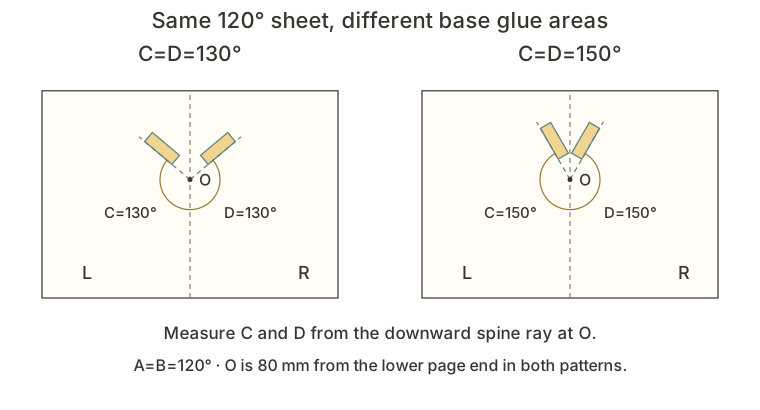
Continue with the annotated diagrams below.
Measure C and D from the downward spine ray at O to the mounting lines. The smaller angle above O is not C, and the paper’s 120° is not the base mounting angle.
For the symmetric, non-degenerate obtuse configuration discussed here, a fully flat base requires C<180°−A or C>A. With A=120°, this becomes C<60° or C>120°. The physical exercises use 130° and 150° from the latter range.
| Paper angle | Mounting angle | What it shows |
|---|---|---|
| A=B=120° | C=D=130° | Above 120°; meets the angle condition for full opening. |
| A=B=120° | C=D=150° | Also meets it; more upright than the 130° example. |
| A=B=120° | C=D=80° | Outside both ranges; cannot follow the base to 180°. |
Select “80° · limited” to see an angular solution limit of about 123.1°. This counterexample shows why movement alone does not establish full opening. It does not establish freedom from base intersections throughout that range and is not an assembly pattern. We also avoid the degenerate equality boundaries.
4. A sheet can fit when open and protrude when closed
A suitable mounting angle still needs a packing check. Keep A=B=120° and C=D=130° and move the whole mechanism at O. The distance is measured along the spine from O to the lower page end; both glue areas move with O.
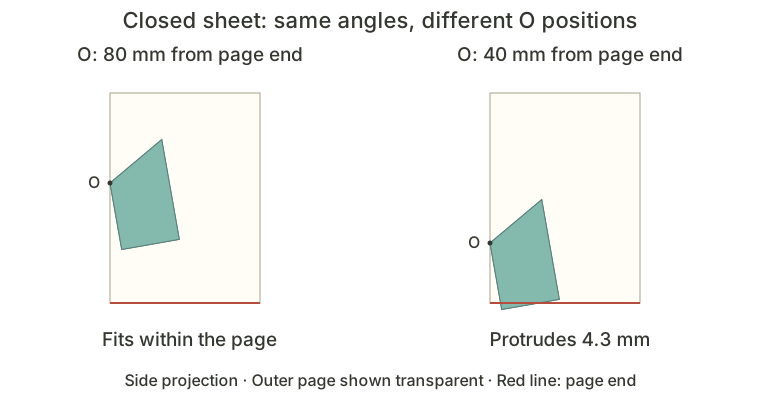
Continue with the annotated diagrams below.
Select “O: 80 mm from page end” and move the opening slowly from 180° to 0°. Repeat at 40 mm. The 40 mm example stays within the page ends when fully open, but protrudes by about 4.3 mm when closed. Sheet dimensions, creases and mounting angles are unchanged.
Check a plain-paper sample at 0°, intermediate openings and 180° before placing characters, text and backgrounds. If it protrudes, first try moving the whole mechanism inward. If space is still insufficient, reduce the sheet or revise the composition. Keep both mounting sides symmetric; do not move just one tab.
The live indicator measures only protrusion beyond the two page ends. Also check side edges, tabs, thickness and contact with other parts. Being within the page ends is one part of the check.
5. Print two patterns and make your own comparison
Download the C=D=130° practice pattern and C=D=150° practice pattern. The pop-up sheets match while the base glue areas differ. Both place O 80 mm from the lower page end. The protruding 40 mm example is not provided as a build pattern.
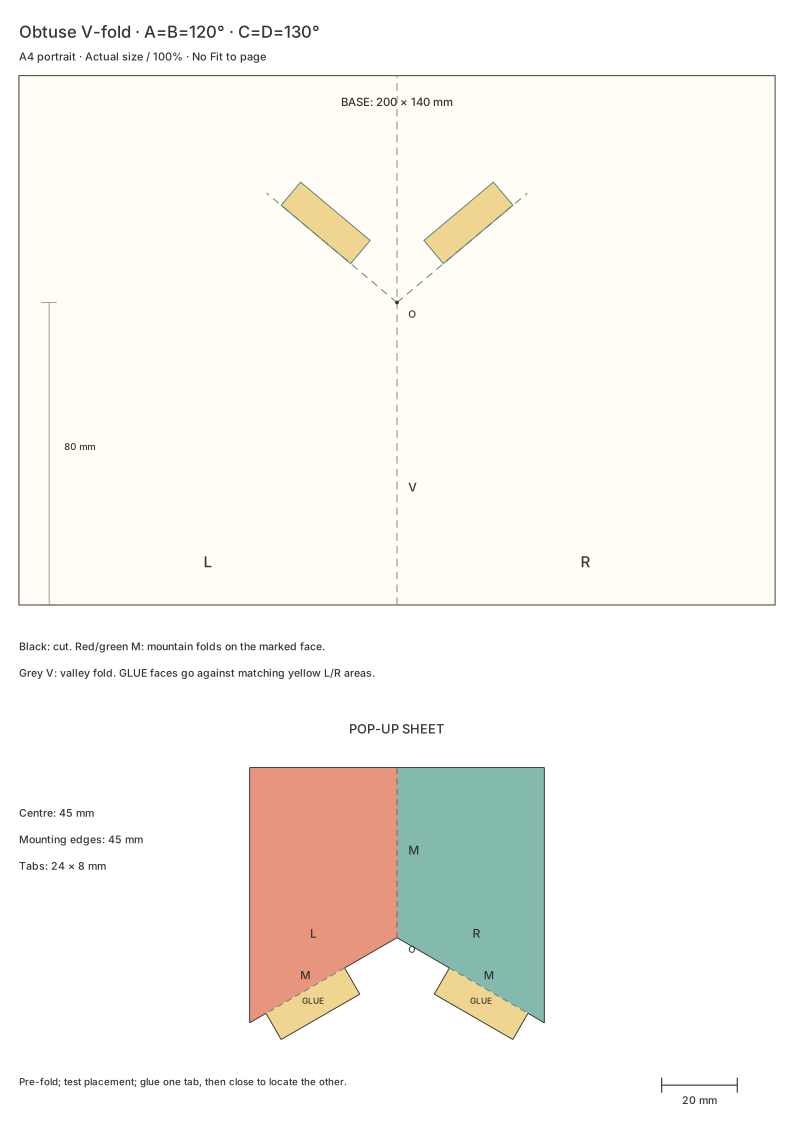
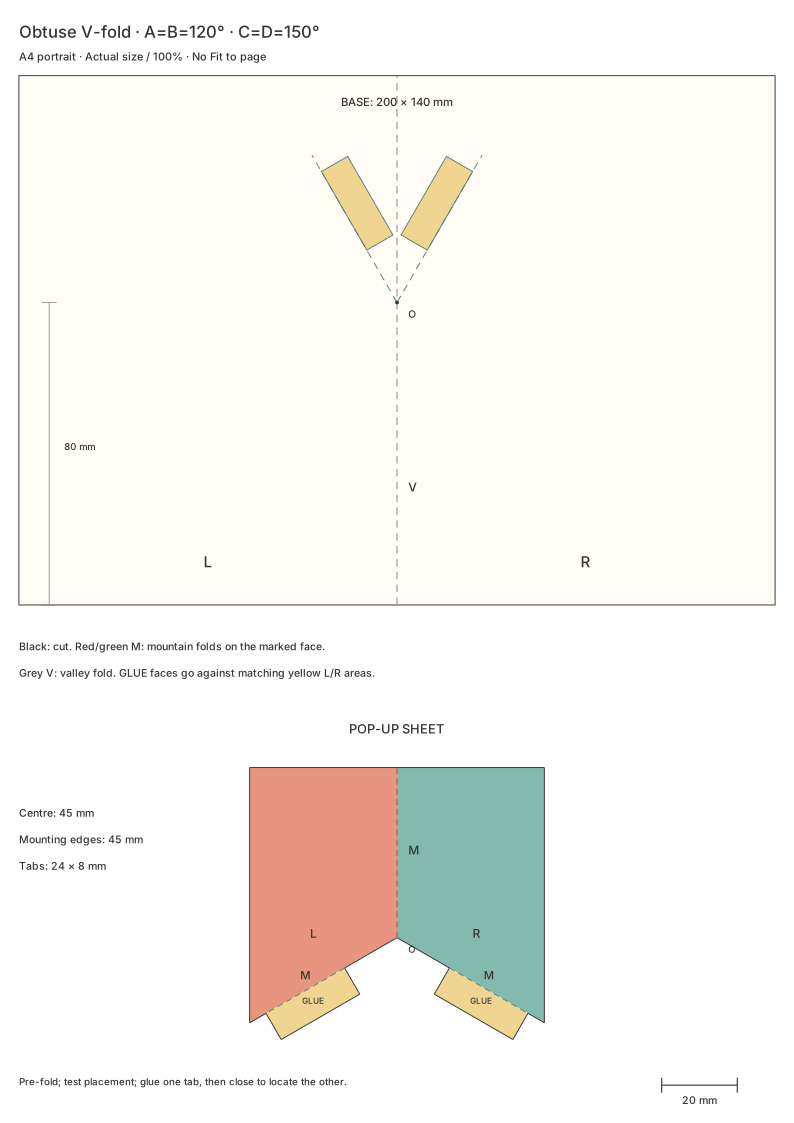
Print portrait on A4 at actual size or 100%, with Fit to page disabled. Measure the 20 mm calibration line near the lower right first. Each base is 200×140 mm, or 100×140 mm per closed page. The centre crease and both mounting edges are 45 mm long, with two 24×8 mm tabs.
1. Score and cut
Lightly score the dashed lines before cutting the black outer outlines. Red is the centre crease, green marks the mounting creases and grey marks the base spine. Cut away the gaps between the tabs and O while leaving both tabs attached to the wings. Keep the red and green dashed lines intact.
2. Pre-fold and test the placement
From the marked face, mountain-fold the red and green M creases and valley-fold the grey V spine. Match the lower end of the centre crease to O and the tabs to the yellow L and R areas. The tab faces marked GLUE face the base. The tabs do not meet at O.
Before gluing, close the sample gently along its pre-folds. Check that the creases move, each tab stays on its own page and the sheet fits inside. Compare the unfolded pattern again if you have measured the other 60° angle or reversed the marked face.
3. Fix one tab, then locate the other by closing
Glue one tab thinly onto its matching area. Apply adhesive to the other tab, fold the mechanism away and close the base to help locate it. Keep adhesive within the tabs and away from moving creases. Follow its instructions for pressing and setting time.
4. Compare after setting, then add artwork
Use the second set for the other mounting angle. Compare at 0°, about 90° and 180°. The sheets match, so the difference should come from the mounting direction. Once both samples move smoothly, draw a simple character or trim a little from the upper silhouette while preserving the centre crease, mounting creases and tabs.
These dimensions are choices for this exercise, rather than fixed proportions for every obtuse V-fold. Assemble a plain-paper sample and check tabs, creases and page edges before making the final version.
6. Check angles, position and fold direction separately
| What happens | What to check first |
|---|---|
| It seems to be an acute V-fold | Measure A and B on the flat sheet, rather than in a photograph. |
| One wing sits higher | Check A=B, C=D and skewed tabs before trimming the outline. |
| It pulls partway through opening | Check mounting range, mountain/valley folds and glued creases. Reopen and inspect. |
| It fits open but protrudes closed | Check the O-to-page-end distance, sheet dimensions and actual folding direction. |
| A camera move seems to change the mechanism | Reset the view and compare presets at the same opening. |
Dragging the view changes the observation direction. Turning the whole mechanism toward the other end of a real spine requires new O and glue positions and another packing check. A camera rotation does not make that installation change.
7. Connect the three symmetric V-fold families
| Paper angle A=B | Our example | At C=D=130° with a flat base |
|---|---|---|
| Below 90° | Acute: 60° | The centre crease leans toward one spine end. |
| 90° | Right: 90° | The centre crease rises vertically. |
| Above 90° and below 180° | Obtuse: 120° | The centre crease leans toward the opposite end. |
To continue in the workbench, create a project from the basic V-fold element, place it on the spine and select it. Set paper angle A to 120° and mounting angle C to 130°. Inspect closed, intermediate and fully open states, then change only C to 150°. The default triangular wings show the angle relationships; use the downloads for this lesson’s straight upper edge.
After making the samples, identify A, C and O on the pattern. Which change determines the paper-angle family? Which changes the mounted lean? Which can move the closed sheet beyond a page end? Separating these questions helps you choose a structure for your own characters, scenes and stories.
Questions you may have
How can I identify an obtuse V-fold pattern?
Unfold the mechanism and measure paper angles A and B between the centre and mounting creases. Both are 120° here. Do not classify it from a perspective photo or measure the supplementary 60° angle on the other side.
Why can a sheet fit when open but stick out when closed?
The sheet changes direction as it folds, so an open-state boundary check is insufficient. Inspect the distance from mounting point O to the page end, sheet dimensions and folding direction. The lesson compares two O positions; its build patterns use 80 mm from the lower page end.
Should I print the obtuse V-fold patterns in landscape?
These two obtuse practice SVGs use A4 portrait. Print at 100% or actual size, disable Fit to page and measure the 20 mm calibration line. Use the orientation stated here rather than the landscape setting of the right-angle and acute exercises.