
V-Fold Pop-Up Card Tutorial: Right-Angle Fold with a Printable Pattern
Build a symmetric V-fold with an A4 SVG practice pattern and interactive 3D demo. Learn the paper angles, creases and glue positions step by step.
Start here: pattern, preview and supplies
Make a plain-paper symmetric V-fold with two wings and two glue tabs. This lesson includes an A4 SVG practice pattern, labelled diagrams and a rotatable 3D opening demo.
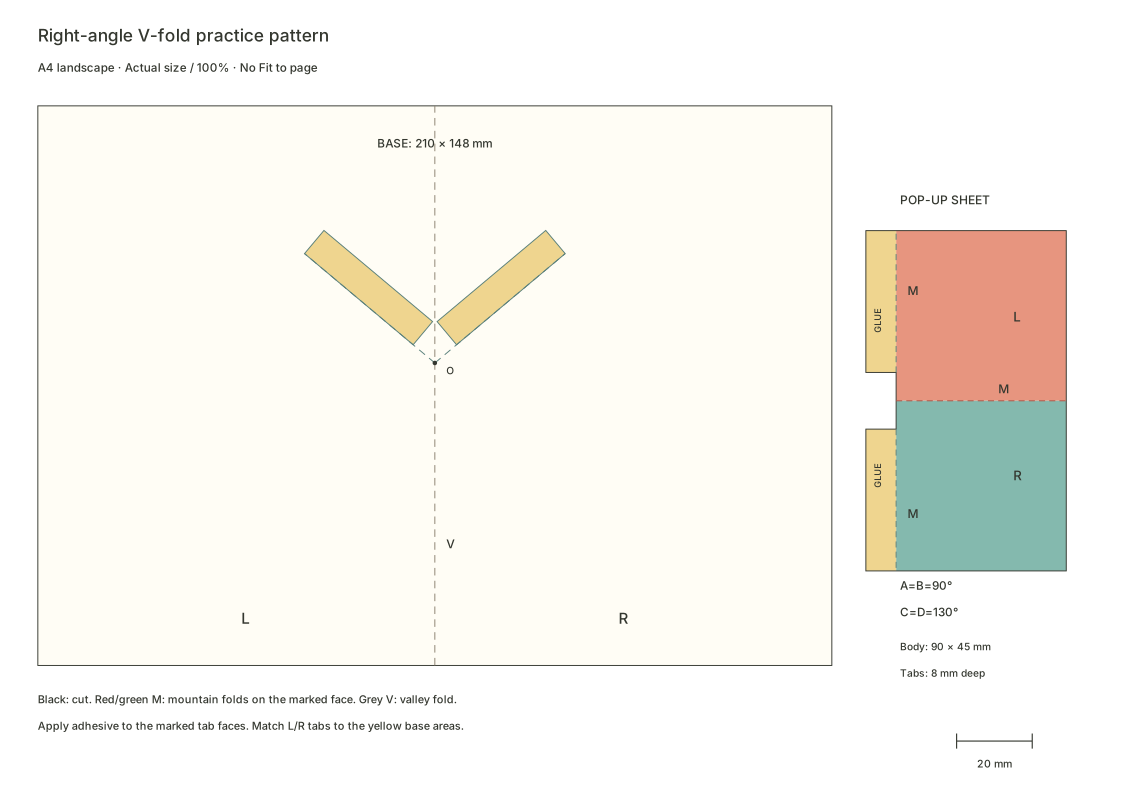
This lesson's practice file is free to download without an account. Print the SVG in A4 landscape at 100% / actual size, turn off Fit to page, and measure the 20 mm calibration line before cutting.
Prepare card, scissors, a ruler, a blunt scoring tool and paper adhesive. Read the materials guide →
The 3D demo represents ideal thin paper. Check your own sample for paper thickness, glue and cutting tolerances; the animation alone does not prove that a physical build will work.
How to make a right-angle V-fold pop-up card
Use this lesson's SVG pattern with a 90° paper angle. Follow the route below and the detailed diagrams for fold directions, glue areas and dimensions. Prepare card, scissors, a ruler, a blunt scoring tool and suitable paper adhesive.
Download and check print scale
Download the right-angle V-fold SVG. Print landscape on A4 at 100% or actual size, disable Fit to page and measure the 20 mm calibration line.
Score before cutting
Score the grey spine, red centre crease and green mounting creases. Cut the black outer outlines, keep both tabs and remove the gaps between them. Leave dashed fold lines intact.
Pre-fold from the marked face
Follow the pattern marks: mountain-fold the red and green creases and valley-fold the grey spine. Work the creases gently so the tabs fold behind the wings.
Test the placement without glue
Align the lower end of the centre crease to O and the tabs to the yellow L and R areas, GLUE faces toward the base. Close gently and check that creases move, tabs stay clear of the spine and the sheet fits inside.
Attach one tab, then locate the other
Glue one tab thinly onto its matching area. Glue the second, fold the mechanism into its pre-creased closed position and close the base to help locate it. Keep glue off moving creases and follow the adhesive's pressing and setting instructions.
Check the full motion after setting
Once the bond has set as directed, move slowly from closed through about 90° to fully open and back. If it catches or protrudes, reopen and inspect creases, glue areas and edges.
Why does a flat piece of paper rise as the pages open, then tuck away when the book closes?
In this lesson, a sheet with one centre crease and two glue tabs becomes a simple symmetric V-fold. Start with plain paper and learn to identify its angles, creases and mounting positions. By the end, you should be able to explain what folds, what stays glued down and how the pages drive the structure.
1. Watch it close and reopen
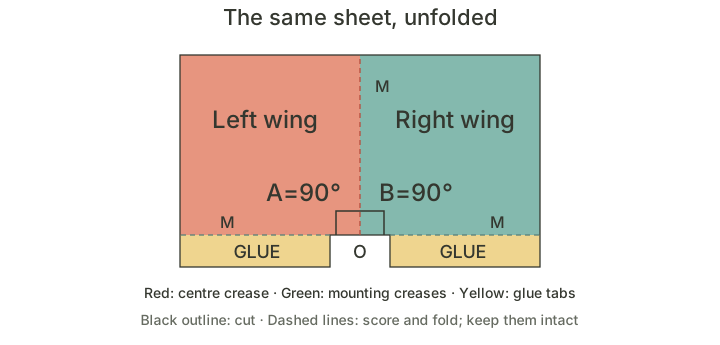
The annotated pattern remains available while the 3D view loads.
Move the opening slider to 0°, then slowly open to 180°. Watch the wings fold together along the centre crease. The two tabs stay attached to their separate base pages and move with them.
Rotate the view to find the yellow tabs behind the wings. Rotating the camera changes your viewing direction; the slider labelled θ controls the page opening.
This example uses fixed angles: A=B=90° and C=D=130°. For now, simply observe the motion without adjusting dimensions or mounting angles.
2. Find two wings, three creases and two tabs
Unfold the pop-up sheet to see its left and right wings. Orange and green distinguish them in the diagram; a single piece of white card works for the exercise.
- Red centre crease: joins the two wings, which fold together here as the book closes.
- Two green mounting creases: join the wings to the tabs. Each wing pivots along this line while its tab stays glued to the base.
- Two yellow glue tabs: attach the left wing to the left base page and the right wing to the right page.
These three creases belong to the pop-up sheet. The base has its own separate spine crease, shown in grey. The pop-up centre crease and the base spine are on different sheets.
Cut the black outer outline. Score and pre-fold the coloured dashed lines without cutting through them. Red and green lines are marked M for mountain folds; the grey spine is marked V for a valley fold. Read fold directions from the marked face of the pattern.
3. Where is the right angle?
On the unfolded pop-up sheet, the centre crease meets each mounting crease at a paper angle, labelled A and B. Here both mounting creases are perpendicular to the centre crease, so A=B=90°. This is what makes it a right-angle V-fold.
These angles are measured on the flat sheet. They are neither the changing angle between the wings in space nor the opening angle of the book.
| Angle | Where to measure | In this lesson |
|---|---|---|
| A, B: paper angles | Centre crease to mounting crease on the unfolded sheet | Fixed at 90° |
| C, D: mounting angles | Spine direction to mounting line on the base | Fixed at 130° |
| θ: page opening | Between the two base pages | Changes from 0° to 180° with the slider |
A right-angle V-fold can therefore work with the book open to 180°. Try the slider again: the page opening changes, but A and B on the paper pattern remain right angles.
Symmetry here first describes the angle relationships: A=B and C=D. The outer silhouettes need not always match. For a first exercise, matching shapes make observation and alignment easier.
4. Where do the tabs attach?
The base below is fully open. A yellow area on each side of the spine marks a tab position. The tabs sit near the spine but stay on their own pages.
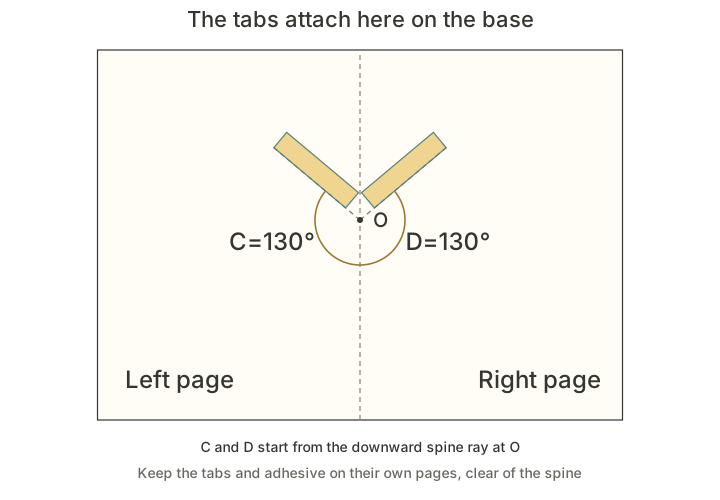
O is an alignment point on the spine. Align the lower end of the pop-up centre crease with O. The two mounting creases, or their guide extensions, also pass through this point. O is not a spot to fill with glue. Apply adhesive to the two separate yellow tab areas.
Measure C and D from the downward spine ray at O to the left and right mounting lines. Both are 130° here. Starting from the other spine ray gives the supplementary angle and a different reading.
The mounting angles determine how the sheet connects to the base. Follow the printed positions for your first sample. A right-angle sheet still needs suitable mounting angles: setting both mounting lines perpendicular to the spine at 90° creates a degenerate arrangement rather than the rising motion shown here.
5. Make a paper sample
Prepare card, scissors, a ruler, a blunt scoring tool and a suitable paper adhesive. See the tools and materials guide for help choosing them.
Download the A4 practice pattern. Print in landscape at 100% or actual size, with Fit to page disabled. Check the 20 mm calibration line at the lower right with a ruler. The base spread is 210×148 mm, making pages of 105×148 mm when folded. The pop-up body is 90×45 mm, with tabs extending a further 8 mm.
1. Score, then cut
Lightly score the grey spine, red centre crease and two green mounting creases. Cut the base and pop-up sheet along the black outlines, keeping both tabs and removing the gap between them. Do not cut the dashed lines.
2. Pre-fold in the marked directions
Valley-fold the grey spine so the marked side faces the inside of the closed book. Mountain-fold the red centre crease, then pre-fold the tabs along both green lines. A mountain fold forms a ridge toward the marked face; the tabs fold behind the wings.
Gently work each crease so it can turn freely. Pre-fold before attempting to close the card, rather than forcing uncreased paper into place.
3. Position without glue
Open the base and align the lower end of the centre crease with O. Match the left and right tabs to the yellow L and R areas. The tab faces marked GLUE should face the base.
Fold the wings together and gently close the base. Check that neither tab crosses the spine and the paper folds to the correct side. If it resists, reopen and check crease directions and alignment.
4. Glue one side, then align the other
Apply a thin layer of adhesive to the marked face of one tab and attach it to its yellow area. Keep the mounting crease aligned with the printed mounting line. Press and wait as directed by the adhesive instructions.
Apply a little adhesive to the second tab. Bring the mechanism into its pre-folded closed position, then close the base to help locate and press the second tab. Keep glue clear of the green mounting creases and red centre crease.
5. Let the bond set, then test the whole motion
Once the bond has set as directed, slowly move from closed through roughly 90° to fully open, then close again. The wings should rise when open and fold back inside the pages when closed. Both tabs should stay attached to their own base pages.
If your first sample catches, inspect its edges, creases and glue areas. Locate the specific problem before adjusting it.
6. Why do the pages drive it?
The connections are the key. The tabs attach to different base pages. Each wing connects to its tab through a mounting crease, and the wings connect through the centre crease. As the pages open, both mounting positions move and the sheet changes its pose along these creases.
If only one tab is glued down, the other side can still swing freely. That is not the two-sided mounting shown in the demo. Parts that merely look as though they touch on screen are not necessarily connected.
Matching paper and mounting angles on both sides makes this first symmetric example easier to align. Once it opens smoothly, try trimming a small upper corner while preserving the centre crease, mounting creases and tabs. Observe whether the structure still works with its new silhouette.
7. If it catches, check these points
| What happens | What to check first |
|---|---|
| The wings pull against each other or twist | Check that both mounting lines align and neither tab is skewed. |
| The book catches when closing | Check pre-folds, glue on moving creases and the direction the paper folds. |
| One side swings without following the page | Check that both tabs are securely attached to their base pages. |
| A fresh joint lifts or shifts | Stop opening, allow the bond to set as directed, then check alignment. |
| It moves, but extends beyond the closed page | Check sheet size, mounting position and folding direction. Motion and fitting within the page need separate checks. |
When you finish, put the instructions aside. Point out A, B, C and D on the pattern, locate the three mechanism creases and two tabs, then explain which two areas stay glued down and which lines can still fold while the pages move.
To keep exploring digitally, open the basic V-fold element, create a project, choose a position on the spine and confirm placement. Select the element and set the flat paper angle A to 90° and the mounting angle C to 130°, then slowly close and reopen. The workbench uses triangular wings by default, which demonstrate the same angle relationships. Use the practice pattern above to make this lesson’s rectangular wings.
Keep the sheet at a right angle while learning one full opening cycle. Later lessons will compare acute and obtuse V-folds.
Questions you may have
Does the right angle in a V-fold mean a 90° page opening?
No. It means paper angles A and B are each 90° between the centre crease and mounting creases on the unfolded mechanism. The page-opening angle θ is separate. This lesson uses its marked mounting areas to explore motion from closed to fully open.
What format is the V-fold pattern, and how should I print it?
The lesson provides directly downloadable Chinese and English A4 SVG practice files. Print landscape on A4 at 100% or actual size, disable Fit to page and measure the 20 mm calibration line first. These downloads are SVGs, not separate PDF files.
What should I check if my glued V-fold will not close?
Reopen without forcing it. Check mountain and valley directions from the marked face, both tabs and mounting lines. Keep glue off moving creases and tabs clear of the spine. Then inspect wing edges and closed-page fit, changing one cause at a time.