
Halloween Pop-Up Card Tutorial: Make a Layered V-Fold Scene
Open, close and inspect each layer of Midnight Candy Alchemist, then make an independent copy to customize.
How to customize a layered Halloween V-fold scene
This workflow customizes the digital practice copy. Inspect and edit the structure before preparing your own physical sample.
Explore the starting scene
Play the opening motion and switch plain-paper and layer views to identify connections for the backdrop, character, cauldron, smoke and foreground.
Create a separate practice copy
Use the lesson's practice-copy entry, keep the complete starting example and change your own version incrementally.
Replace artwork one layer at a time
Separate the character from its background, preserve supports and mounting areas and replace one layer at a time. Check contours, dimensions and occlusion.
Inspect connections and closed-page fit
After each change, close slowly, pass through intermediate angles and reopen. Inspect connections and page edges from the side and back; start troubleshooting with the layer just changed.
Prepare a plain-paper test
Check print layout, dimensions and export access, then test the character support and foreground in plain paper. Add layers incrementally, checking creases, glue areas, closed-page fit and material thickness.
Open the card and a young magician rises beside a cauldron of sweets, holding a wooden spoon. A black cat peeks out, friendly ghosts hide in the smoke, and pumpkins and autumn leaves fill the foreground. Close the pages slowly and the scene folds back between them.
Midnight Candy Alchemist combines five V-fold mechanisms with one separate character cutout. The paper angles, mounting angles and closed-page checks from the foundation lessons now have a practical purpose: placing the smoke, shaping the foreground and fitting the character inside the card.
This tutorial takes the scene apart so you can see how it works. Start with a character support and one foreground layer, then build up the composition, inspect the motion and prepare a physical test. You can also use the same approach for your own character.
Explore the scene before making it
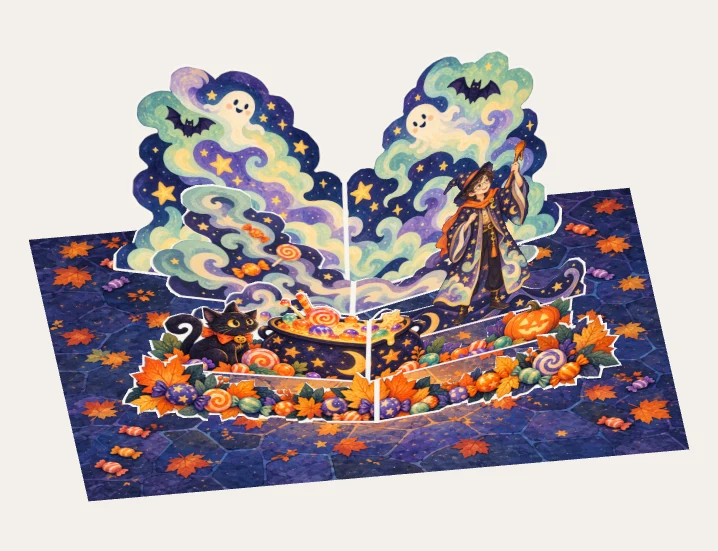
Look at the depth between the character, cauldron and smoke.
Layer isolation only changes visibility. The folding motion and geometry stay unchanged.1. Understand the parts of the card
The open base measures 297 × 210 mm, the size of a landscape A4 sheet. The paving and scattered sweets are printed on the base. The standing elements are separate pieces of paper.
Switch the interactive model to plain paper to see the structure without its printed artwork. This keeps the outlines and dimensions while revealing the supporting folds.
| Layer | Artwork | Purpose |
|---|---|---|
| Front edge | Leaves and sweets | A low outline frames the scene without hiding the character |
| Foreground | Cauldron, cat and pumpkin | Shows what the character is doing |
| Character support | A low star-patterned strip and small cloud | Carries the separate character cutout |
| Middle background | Asymmetric candy smoke | Connects the cauldron to the backdrop and leaves room for the face |
| Backdrop | Tall smoke with ghosts and bats | Establishes height and the Halloween setting |
The character is one separate piece of paper. Its lower area is glued to the right wing of its support. The face, body and raised spoon remain on the same piece.
Some objects that look separate, such as the cat, pumpkin and sweets, share a continuous paper silhouette. A strip at the bottom connects them. Each sweet does not need its own mechanism.
Five layers suit this composition. For a first practice, work on a character support and one foreground layer before adding more. The layer buttons isolate parts for observation; they do not remove parts from your practice project.
2. Prepare for a small first exercise
If you have never made a V-fold, start with the right-angle V-fold exercise. Learn to identify the centre crease, mounting creases and glue tabs before working on several layers.
For digital design, prepare a background, a separate character and the standing artwork. For the paper test, gather printable paper, a ruler, scissors, a scoring tool and adhesive. Use a cutting mat if internal cuts require a craft knife. See the tools and materials guide for preparation.
Use plain paper to test a character support and one foreground layer. Ask three questions: does the character stand where you want it, does the foreground hide it, and can the pieces fit inside the closed pages?
Multiple layers can build up thickness around the folds. Test the support and folding resistance of your paper before choosing stock for a final colour print.
3. Start with the character and its support
The character in this scene stands on the right with a raised spoon. The cauldron sits to the front left, leaving a visible relationship between the action and the object.
Select Character + support in the model. Follow the bottom of the character to the wing that carries it. Change the opening angle and watch that connection move.
Keep the character's entire glue area on one support face. Do not glue a rigid character across both wings. The wings need to fold relative to each other along the centre crease; bridging them would restrict that motion.
When replacing the character in your own project, begin with a similar size and footprint. Check the face, hat, hand and prop before changing the dimensions. A wider pose or taller prop needs a new outline and a fresh check of support and closed-page fit.
If the character leans too far, inspect its supporting wing. Both paper and mounting angles affect the pose. The acute V-fold comparisons help distinguish their effects. Change one condition at a time and repeat the opening motion.
4. Arrange the foreground and background
Once the character is positioned, add the cauldron to the front left. With the card fully open, check the main viewing direction: does the rim hide the character's hand, can you see the cat's face, and does the pumpkin stay below the character?
The middle smoke is taller on the left and lower on the right. It extends the cauldron's activity upward while leaving space around the face. The taller backdrop carries the ghosts and bats.
Keep the front strip of leaves and sweets low. It may hide parts of the support bases, but should leave the central action visible.
- Open the card fully and check the main subject from the front.
- Keep the same opening angle and rotate the view to inspect the gaps between layers.
- Close the book slowly and watch which edges approach each other.
- Close and reopen before adding another layer.
Each V-fold can have its own position, angles and outline. Preserve the folding and mounting relationships of each mechanism. Extending its mounting lines should lead to the corresponding focus on the spine; the actual glue tabs can start away from that point.
Use the layer buttons to inspect the arrangement. Hiding a layer changes only what you see; the underlying connections stay in place.
5. Turn Halloween artwork into cuttable paper
Prepare the base and standing pieces separately. Keep paving, fallen leaves and colour on the base. Avoid printing a second complete character, cauldron or smoke silhouette on the ground beneath the standing version.
Keep the character's silhouette complete. For other layers, consider connections as well as appearance: a cat's tail, a smoke tip or a narrow bridge between sweets must survive cutting and handling.
A star near the smoke can be printed inside the smoke's paper outline. If you cut away all the paper around it, it needs a real connection elsewhere. A floating shape in a transparent image will not hold itself in place after cutting.
| Area | What to preserve |
|---|---|
| Face and body | An uninterrupted image, clear of the moving centre crease |
| Bottom of each layer | Continuous paper connecting to the mounting area |
| Separate-looking objects | A connecting strip if they share one piece of paper |
| Centre crease | Continuous material needed for the fold |
| Glue area | Actual paper, not a transparent gap |
If you use AI to help illustrate the scene, prepare assets according to these divisions: a complete character, a low connected foreground, and a backdrop that leaves a clear silhouette around the character. Check the bridges and mounting areas after generation. Printed shadows, a rounded cauldron rim or smoke shading do not all need additional structural parts.
For a first personal variation, replace the character and background while keeping the structure. Check motion and fit before attempting more complex outlines.
6. Inspect the motion as well as the open composition
At full opening the layers are spread apart, which can conceal problems. Set the opening to about 90° and watch them approach each other. Continue toward closure, paying particular attention to the hat, spoon and wide foreground.

Some backs become visible during closing. This version primarily illustrates the fronts; a double-sided finish needs separately prepared, aligned back artwork.
Can the mechanism reach the intended opening? If it stops partway, check the mounting and angle relationships before assuming that two layers have collided.
Do pieces intersect during the motion? Move slowly through intermediate positions as well as 0°, 90° and 180°. After moving or reducing a layer, repeat the same motion.
Does the closed card contain all the paper? Being above the base when open does not guarantee a closed-page fit. The obtuse V-fold packing comparison shows the difference. A taller character, longer spoon or moved mechanism needs another check.
After changing the character, outline or placement, check visibility, opening motion and closed-page fit again.
7. Prepare a physical test before the final print
Open your independent practice copy to continue editing. Before printing, identify the base, each mechanism and the character on the exported sheets. Check part labels, cut lines, mountain and valley folds, and glue regions. An A4 base does not mean that every part fits on the same A4 print sheet.
Print at 100% or actual size, disable Fit to page, and measure a known dimension before cutting. If the printer cannot print to the edge, check the margins rather than automatically shrinking the entire layout.
Begin with a plain-paper test of the character support and one foreground layer. Follow the fold directions and glue areas on the pattern, rather than guessing from a finished view. Dry-fit the parts, confirm that the connection does not bridge a moving crease, then glue. Check after each addition.
Allow the adhesive to set and dry according to its instructions. Close the card slowly. If it resists, locate the cause: a caught edge, glue on a moving crease, or several layers building up in one place. Record the issue, adjust the project and print the affected parts again.
Use the first plain-paper sample to check thickness, folds and assembly. Make any adjustments before producing a final colour version.
Questions while making the card
Do I need to learn all three V-fold types first?
Start with the right-angle exercise, then try replacing artwork while preserving the structure. Revisit the acute and obtuse lessons when changing lean or mounting angles. Identify whether a change affects the illustration, the paper outline or the folding geometry.
Why does the character's face fold when I close the card?
Check whether the face crosses a moving crease or the character is glued across two wings. In this example, the whole character attaches to one wing so its face and body stay on one sheet.
Why does adding layers make the picture harder to read?
Look from the intended viewing direction and inspect one obstruction at a time. Lower a foreground, change an outline or use fewer layers to reveal the main subject.
Can I use my own photograph or another holiday theme?
You can replace the character with one based on your photograph, or turn the sweets, pumpkins and ghosts into a birthday or winter scene. Check the outline, glue area and closed-page fit after each change. After changing dimensions or poses, close and reopen the card to check the fit.
Give your scene one clear action: who is doing what, and where does something appear? Let the character and a foreground layer communicate that action first, then decide whether the scene needs more paper.
Questions you may have
Is there a ready-to-print download for this Halloween pop-up card?
The lesson provides an interactive scene and an editable practice copy. A separate ready-to-print kit is not supplied. Check layout, dimensions, glue areas and export access in the workbench, then start with a simplified plain-paper sample.
Why separate the character, smoke and foreground?
They have different visual and connection roles. The character needs a real support; smoke and foreground create depth and occlusion. Inspect and replace them separately to distinguish structural problems from visual overlap.
Will opening the practice copy overwrite the original case?
The practice entry creates a separate project. Check artwork dimensions and connections after opening it, then customize incrementally. Editing your copy does not overwrite the starting case.